

Move to Nextcloud with control and confidence
Section titled “Move to Nextcloud with control and confidence”SMART Migration helps you discover, select, migrate and document your file migration from Microsoft 365, SharePoint Server and file shares to Nextcloud Files.
Combine content analysis, app-based migration management and file-level reporting to make informed decisions and deliver a documented transition to your Nextcloud environment.
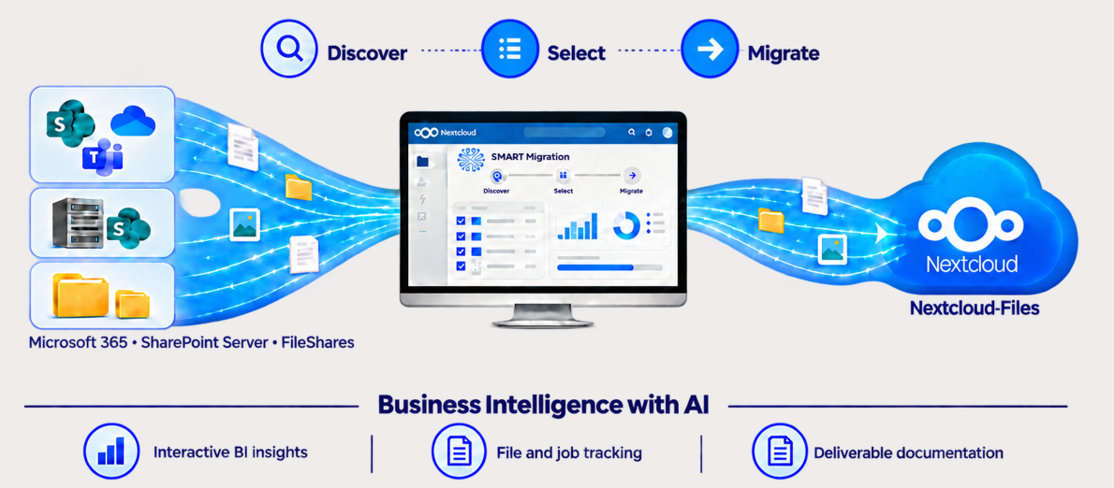
Figure 1. Discover source content, define the scope, migrate files and document the results.
What Your Organisation Gains
Section titled “What Your Organisation Gains”An informed migration scope
Understand your content before moving it. Select the files your organisation needs and plan how they should be organised in Nextcloud.
A controlled transition
Manage migration jobs, follow progress and transfer new or changed files through recurring jobs as you prepare for the transition.
Evidence for project handover
Review what moved, where it went and whether it succeeded. Retain file-level traceability and audit documentation after completion.
How the Platform Works
Section titled “How the Platform Works”SMART Migration requires both the Nextcloud App and the SMART Migration Server.
Nextcloud App — manage the project
Define migration jobs, follow progress and review results through the management interface within Nextcloud.
SMART Migration Server — perform the work
A separate Windows application reads source content, executes migrations and generates reports. It must be installed and connected to the app.
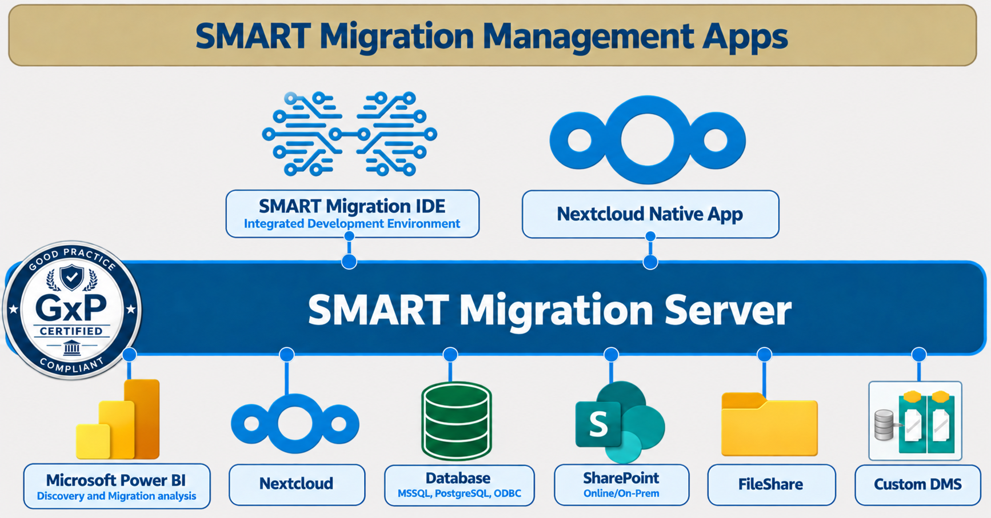
Figure 2. App-based migration to Nextcloud Files, supported by BI insights, file and job tracking, and project documentation.
From Preparation to Handover
Section titled “From Preparation to Handover”A practical workflow for your migration
- Prepare: Install the app and server, configure connections and verify destination folders and user accounts.
- Discover: Scan source content to understand files, storage volume, age, metadata and version history.
- Select: Choose the content to move and map libraries, folders and users to their Nextcloud destinations.
- Migrate: Execute migration jobs and use recurring jobs to transfer new and changed files after the initial migration.
- Review: Investigate failures and verify destination content before completing the project.
- Document: Retain the Power BI report as a record of the file inventory and migration results.
Migration Capabilities and Business Value
Section titled “Migration Capabilities and Business Value”| Capability | What it supports | Value for your project |
|---|---|---|
| Source systems | SharePoint Online, OneDrive, Teams files stored in SharePoint, SharePoint Server and file shares | Bring content from multiple sources into Nextcloud Files |
| File formats | Office documents, PDFs, images, videos, text files and ZIP archives; OneNote requires separate assessment | Move the everyday content your users rely on |
| Folder mapping | Map libraries and folders to Nextcloud Team or User Folders, consolidate sources and create Team Folders dynamically | Organise content around your destination structure |
| Version history | Preserve file versions, timestamps, users and SharePoint check-in comments | Retain document history and context |
| Metadata | Transfer SharePoint columns and metadata using Nextcloud tags or MetaVox, depending on destination configuration | Keep information that helps users classify and find content |
| Metadata transformation | Direct mapping, lookups, concatenation, conditional logic and data-type conversion | Adapt source data to your Nextcloud requirements |
| OneDrive user mapping | Automatically discover OneDrives and map them to Nextcloud User Folders, with mappings reviewed before execution | Reduce manual mapping work across users |
| Incremental migration | Transfer new and changed files through recurring jobs | Support a phased transition and maintain a parallel file environment |
| Reverse migration | Supported migration paths also include Nextcloud to SharePoint | Provide flexibility when destination requirements change |
BI Discovery and Project Documentation
Section titled “BI Discovery and Project Documentation”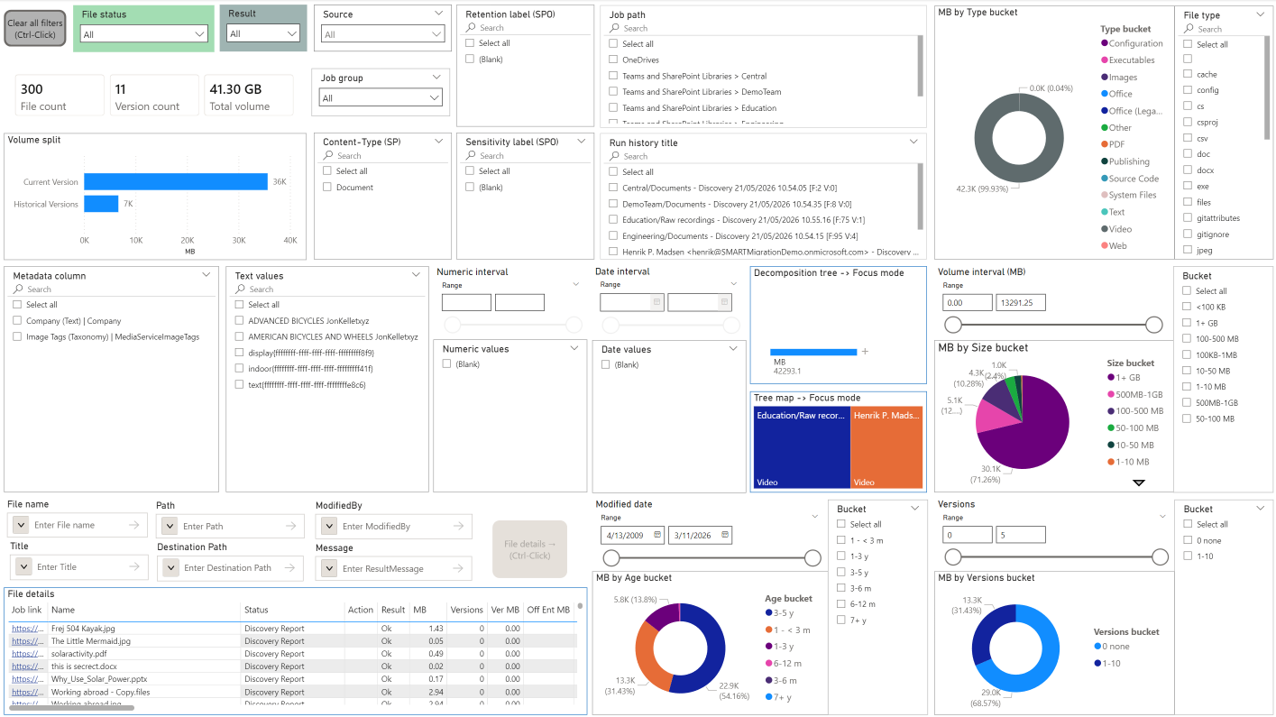
Figure 3. Filter the Power BI report by source, file type, volume, age, versions and migration results.
One report from discovery to final review
Use the interactive Power BI report to identify content to migrate, retain, reorganise or archive. During execution, explore job and file results to focus corrective action where it is needed.
At handover, retain the .pbix report as a lasting project record. It operates independently of SMART Migration after completion, allowing later review without keeping the migration server running.
Maintain a Parallel Nextcloud Environment
Section titled “Maintain a Parallel Nextcloud Environment”Support operational resilience and continuity planning
Recurring migration can keep a parallel Nextcloud file environment up to date with new and changed source files. This can support operational resilience and DORA-related continuity planning, alongside your organisation’s access controls and operational procedures.
Optional SharePoint URL Links
Section titled “Optional SharePoint URL Links”Help users find files in their new location
After migration, original SharePoint files can be replaced with small URL links to their migrated copies in Nextcloud. Users can continue finding content through the existing SharePoint library while the file itself resides in Nextcloud.
Storage benefit: Replacing the original file with a URL link reduces its storage footprint in SharePoint.
Before conversion: Verify the migrated content and destination access. Following a link does not grant access; users must have the appropriate Nextcloud access rights.
Prepare for a Successful Migration
Section titled “Prepare for a Successful Migration”Validate the destination before scaling up
Access rights: Source permissions are not migrated. Configure access rights separately in Nextcloud to protect the migrated content.
Accounts and mappings: Verify Nextcloud accounts and OneDrive user mappings before execution.
Metadata configuration: Confirm whether Nextcloud tags or MetaVox will be used and validate the metadata mappings.
Pilot migration: Test representative files, versions and metadata before running the full migration.
Scope: This solution covers file migration. Email, calendars and application workflows are outside its scope.
See also