Add-FlowLogRow -LogType “String” -Message “String”
Section titled “Add-FlowLogRow -LogType “String” -Message “String””Add a message to the Session Log
Section titled “Add a message to the Session Log”The command is asynchronous so you can monitor the progress of your script as it executes in the Step’s Job tab.
| -LogType | Argument Description |
|---|---|
| Add an “Information” message. The output of the PowerShell command argument -WarningVarible is picked up when using the variable name FlowWarning. If a warning was issued by preceding PowerShell commands the -LogType “Information” argument will automatically convert into “Warning” and include the value from the $FlowWarning variable in the message. |
| Add a “Warning message. |
| Add an “Error” message. The action taken depends on the ‘On error’ configuration defined in the section ‘Custom logging’ on the Step’s options tab. |
| Add an “Information” message and stop the job. |
| Add an “Information” message and exit the current Group Step without running any of the following Steps. |
Example
Section titled “Example”Add-FlowLogRow -LogType "Information" -Message "Something is going on .."
Example of enhanced exception trace logging
Section titled “Example of enhanced exception trace logging”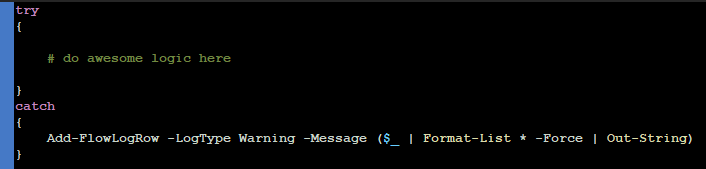
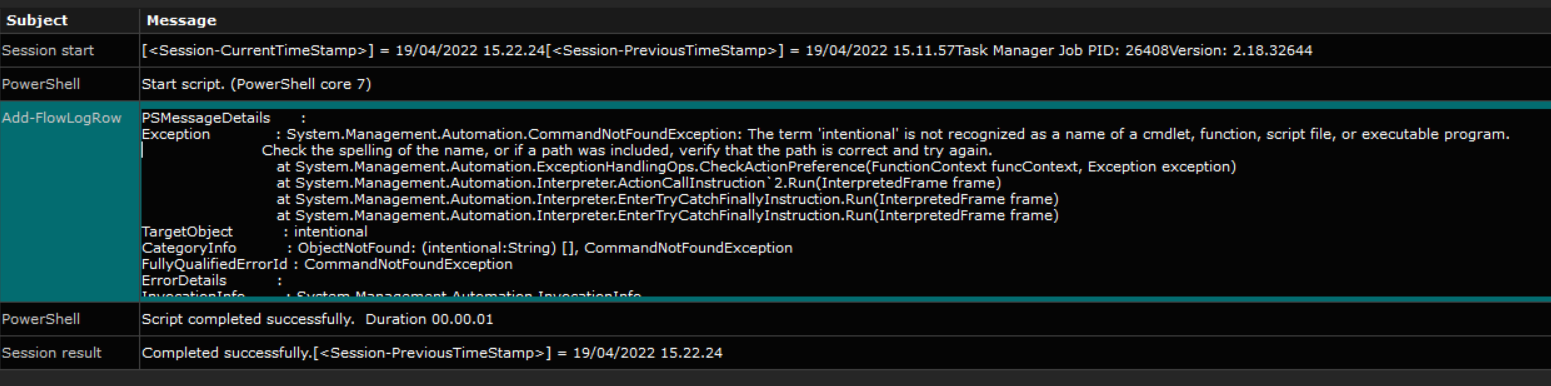
The log generated when an exception is thrown in the above example
Section titled “The log generated when an exception is thrown in the above example”