

The rule is on the Destination step of the job dialog, in Advanced Settings. The default, Add New Overwrite Existing By Newer, is the standard incremental migration and the usual choice: a migration is incremental unless you choose otherwise.
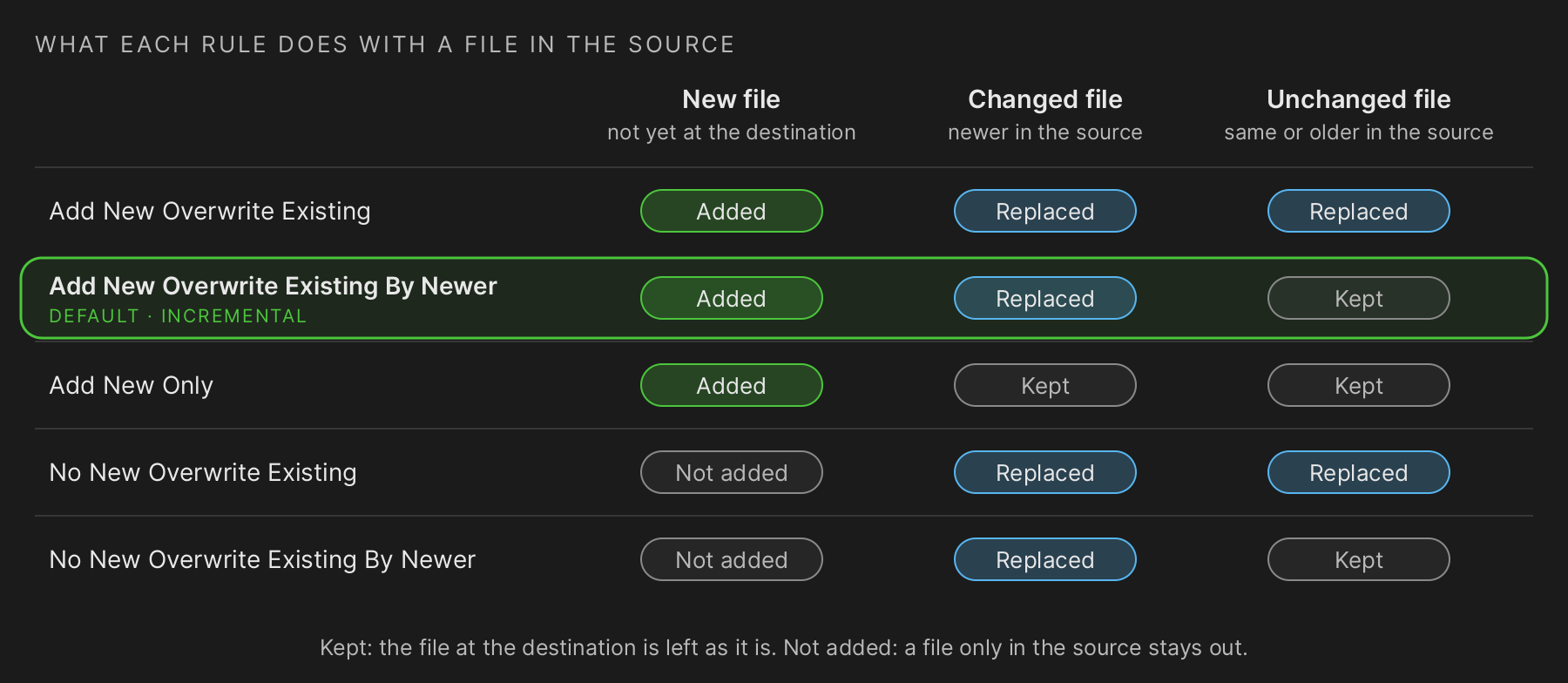
Diagram: what each rule does with a file in the source. Columns: new file (not yet at the destination), changed file (newer in the source), unchanged file (same or older in the source). Add New Overwrite Existing: Added, Replaced, Replaced. Add New Overwrite Existing By Newer (the default, incremental): Added, Replaced, Kept. Add New Only: Added, Kept, Kept. No New Overwrite Existing: Not added, Replaced, Replaced. No New Overwrite Existing By Newer: Not added, Replaced, Kept. Kept: the file at the destination is left as it is. Not added: a file only in the source stays out.
The five rules
Section titled “The five rules”| Rule | New files | Files already at the destination |
|---|---|---|
| Add New Overwrite Existing | Added | Always replaced with the source copy |
| Add New Overwrite Existing By Newer | Added | Replaced only when the source copy is newer. The default, and the standard incremental result. |
| Add New Only | Added | Never touched |
| No New Overwrite Existing | Not added | Always replaced with the source copy |
| No New Overwrite Existing By Newer | Not added | Replaced only when the source copy is newer |
Run the same migration again
Section titled “Run the same migration again”A Migration job is made to be run more than once. Its default rule, Add New Overwrite Existing By Newer, makes every run after the first an incremental one: it copies the files that are new or have changed in the source since the last run, and leaves the rest alone. Run it during the project to keep Nextcloud close to the source, and once more just before go-live for the final synchronisation. Each run gets its own Run History row and report.
Each run still reads the whole source and checks every file against the destination. With incremental runs it reads — and checks — only the files created or modified since the last successful run: far fewer files to compare, and a much faster run. See Incremental runs: only the files changed since the last run
The rule can be fine-tuned for the repeat runs: Add New Only brings in new files but leaves files already migrated as they are, even when the source copy changed; the other rules are below.
Which rule to choose
Section titled “Which rule to choose”Phased and recurring migrations
Add New Overwrite Existing By Newer. Every run copies what is new or has changed since the last one, and leaves the rest. Run the same job again before go-live for a final synchronisation.
Protect work done in Nextcloud
Add New Only. Files people have already changed in Nextcloud are never replaced by an older or a newer SharePoint copy. New files still arrive.
Refresh what is there, add nothing
No New Overwrite Existing By Newer. Updates the files that were migrated before, without bringing in anything new — for example after a scope was narrowed.
Start the copy over
Add New Overwrite Existing. Every file is written again, whatever is at the destination. Use it deliberately: changes made in Nextcloud are overwritten.
During coexistence the same document exists twice
While SharePoint and Nextcloud are both in use, a document may be edited in both places. The rules decide which copy wins in the destination; they do not merge edits. Plan a controlled cutover, or replace the SharePoint file with a .url link to its Nextcloud copy so only one editable copy remains.
Both ways are described in Cutover: Traditional and Enhanced Migration
See also